
Another ASP.NET WebParts Connections Sample
Another ASP.NET WebParts Connections Sample
July 2004
Summary:
This article shows another sample of using WebParts.
In this case we will create two WebParts:
- Author WebPart that displays the list of authors in the database.
- Books WebPart that displays the list of books in the database.
Both WebParts are completely independent from each other.
However when a user chooses to connect them, the Authors WebPart provides an IField interface to the Books webpart that is used to filter the books so only the ones from the selected author will be displayed.
We will also show other features of WebParts to illustrate how a user can add WebParts to his page that are only available through the Catalog not already in the page.
Visits:
The Code
Lets first show the code.
To run this sample you have to create a new WebSite in Visual Web Developer Express or use Visual Studio .NET 2005 (or just create a virtual directory in IIS).
The Page
Lets start by showing how simple the page is:Save the following code in a file with the extension .ASPX:
<%@ Page Language="C#" %>
<%@ Register TagPrefix="my" Namespace="MyWebParts" %>
<html>
<head runat="server">
<title>WebParts Sample</title>
</head>
<body>
<form id="form1" runat="server">
<asp:WebPartManager runat="server" ID="WPM" />
<asp:WebPartPageMenu runat="server" ID="WPPM" />
<asp:WebPartZone runat="server" ID="Zone1" />
<asp:ConnectionsZone runat="server" ID="connectionsZone1" />
<asp:CatalogZone runat="server" ID="catalogZone1">
<ZoneTemplate>
<asp:DeclarativeCatalogPart runat="server" ID="declarative1">
<WebPartsTemplate>
<my:AuthorWebPart runat="server" ID="author1" Title="Authors" />
<my:BooksWebPart runat="server" ID="books1" Title="Books" />
</WebPartsTemplate>
</asp:DeclarativeCatalogPart>
<asp:PageCatalogPart runat="Server" ID="pageCatalog1" />
</ZoneTemplate>
</asp:CatalogZone>
</form>
</body>
</html>
The first thing to notice is that we are not adding any WebPart to the WebPartZone,
the WebParts are only "declared" to be available using a CatalogZone, in this case
we are using the DeclarativeCatalogPart that allows to define a set of WebParts
that are available for the user.
<%@ Register TagPrefix="my" Namespace="MyWebParts" %>
<html>
<head runat="server">
<title>WebParts Sample</title>
</head>
<body>
<form id="form1" runat="server">
<asp:WebPartManager runat="server" ID="WPM" />
<asp:WebPartPageMenu runat="server" ID="WPPM" />
<asp:WebPartZone runat="server" ID="Zone1" />
<asp:ConnectionsZone runat="server" ID="connectionsZone1" />
<asp:CatalogZone runat="server" ID="catalogZone1">
<ZoneTemplate>
<asp:DeclarativeCatalogPart runat="server" ID="declarative1">
<WebPartsTemplate>
<my:AuthorWebPart runat="server" ID="author1" Title="Authors" />
<my:BooksWebPart runat="server" ID="books1" Title="Books" />
</WebPartsTemplate>
</asp:DeclarativeCatalogPart>
<asp:PageCatalogPart runat="Server" ID="pageCatalog1" />
</ZoneTemplate>
</asp:CatalogZone>
</form>
</body>
</html>
We also added to the page a WebPartPageMenu that will allow us to move between the different display modes of WebParts.
The WebParts
Save the following code into a file named MyWebParts.cs or MyWebParts.vb and save it inside a Code
directory inside the virtual directory.
C# Code
namespace MyWebParts {
using System;
using System.Drawing;
using System.ComponentModel;
using System.Web.UI.WebControls;
using System.Web.UI.WebControls.WebParts;
/// <summary>
/// WebPart to display the information of Authors
/// </summary>
public class AuthorWebPart : WebPart, IField {
GridView _view;
public AuthorWebPart() {
}
protected override void CreateChildControls() {
_view = new GridView();
_view.ID = "_authorsGrid";
_view.AutoGenerateColumns = true;
_view.DataKeyNames = new string[] { "au_id" };
CommandField field = new CommandField();
_view.SelectedRowStyle.BackColor = Color.Red;
field.ShowSelectButton = true;
_view.Columns.Add(field);
SqlDataSource ds = new SqlDataSource();
ds.ID = "_authorsDS";
ds.ConnectionString = "server=carlosagmail;database=pubs;uid=sa;pwd=yourpassword";
ds.SelectCommand = "select au_id, au_lname, au_fname from authors";
_view.DataSourceID = ds.ID;
this.Controls.Add(ds);
this.Controls.Add(_view);
}
[ConnectionProvider("AuthorID")]
public IField GetAuthor() {
return this;
}
#region IField Members
object IField.FieldValue {
get {
return _view.SelectedValue;
}
}
PropertyDescriptor IField.Schema {
get {
return TypeDescriptor.GetProperties(this.GetType())["FieldValue"];
}
}
#endregion
}
/// <summary>
/// WebPart to display the information of Books
/// </summary>
public class BooksWebPart : WebPart {
private IField _authorField;
SqlDataSource _ds;
[ConnectionConsumer("Author")]
public void SetAuthor(IField field) {
this._authorField = field;
}
protected override void CreateChildControls() {
GridView view = new GridView();
view.ID = "_booksGrid";
view.AutoGenerateColumns = true;
view.DataKeyNames = new string[] { "title_id" };
CommandField field = new CommandField();
view.SelectedRowStyle.BackColor = Color.Red;
field.ShowSelectButton = true;
view.Columns.Add(field);
_ds = new SqlDataSource();
_ds.ID = "_booksDS";
_ds.ConnectionString = "server=carlosagmail;database=pubs;uid=sa;pwd=yourpassword";
view.DataSourceID = _ds.ID;
this.Controls.Add(_ds);
this.Controls.Add(view);
}
protected override void OnPreRender(EventArgs e) {
const string selectStatement = "SELECT titles.title_id, titles.title, titles.type, titles.price, titles.pubdate FROM titles";
EnsureChildControls();
if (_authorField != null) {
if (_ds.SelectParameters.Count == 0) {
_ds.SelectCommand = selectStatement + " INNER JOIN titleauthor ON titleauthor.title_id = titles.title_id WHERE (titleauthor.au_id = @au_id)";
_ds.SelectParameters.Add(new Parameter("au_id", TypeCode.String, (string)_authorField.FieldValue));
}
else {
_ds.SelectParameters["au_id"].DefaultValue = (string)_authorField.FieldValue;
}
}
else {
_ds.SelectParameters.Clear();
_ds.SelectCommand = selectStatement;
}
_ds.DataBind();
base.OnPreRender(e);
}
}
}
VB.NET Code
Imports System
Imports System.Drawing
Imports System.ComponentModel
Imports System.Web.UI.WebControls
Imports System.Web.UI.WebControls.WebParts
Namespace MyWebParts
' <summary>
' WebPart to display the information of Authors
' </summary>
Public Class AuthorWebPart
Inherits WebPart
Implements IField
Private _view As GridView
Public Sub New()
MyBase.New()
End Sub
ReadOnly Property FieldValue() As Object _
Implements IField.FieldValue
Get
Return _view.SelectedValue
End Get
End Property
ReadOnly Property Schema() As PropertyDescriptor _
Implements IField.Schema
Get
Return TypeDescriptor.GetProperties(Me.GetType)("FieldValue")
End Get
End Property
Protected Overrides Sub CreateChildControls()
_view = New GridView
_view.ID = "_authorsGrid"
_view.AutoGenerateColumns = True
_view.DataKeyNames = New String() {"au_id"}
Dim field As CommandField = New CommandField
_view.SelectedRowStyle.BackColor = Color.Red
field.ShowSelectButton = True
_view.Columns.Add(field)
Dim ds As SqlDataSource = New SqlDataSource
ds.ID = "_authorsDS"
ds.ConnectionString = "server=carlosagmail;database=pubs;uid=sa;pwd=yourpassword"
ds.SelectCommand = "select au_id, au_lname, au_fname from authors"
_view.DataSourceID = ds.ID
Me.Controls.Add(ds)
Me.Controls.Add(_view)
End Sub
<ConnectionProvider("AuthorID")> _
Public Function GetAuthor() As IField
Return Me
End Function
End Class
' <summary>
' WebPart to display the information of Books
' </summary>
Public Class BooksWebPart
Inherits WebPart
Private _authorField As IField
Private _ds As SqlDataSource
<ConnectionConsumer("Author")> _
Public Sub SetAuthor(ByVal field As IField)
Me._authorField = field
End Sub
Protected Overrides Sub CreateChildControls()
Dim view As GridView = New GridView
view.ID = "_booksGrid"
view.AutoGenerateColumns = True
view.DataKeyNames = New String() {"title_id"}
Dim field As CommandField = New CommandField
view.SelectedRowStyle.BackColor = Color.Red
field.ShowSelectButton = True
view.Columns.Add(field)
_ds = New SqlDataSource
_ds.ID = "_booksDS"
_ds.ConnectionString = "server=carlosagmail;database=pubs;uid=sa;pwd=yourpassword"
view.DataSourceID = _ds.ID
Me.Controls.Add(_ds)
Me.Controls.Add(view)
End Sub
Protected Overrides Sub OnPreRender(ByVal e As EventArgs)
Dim selectStatement As String = "SELECT titles.title_id, titles.title, titles.type, titles.price, titles.pubdate FROM titles"
EnsureChildControls()
If (Not (_authorField) Is Nothing) Then
If (_ds.SelectParameters.Count = 0) Then
_ds.SelectCommand = (selectStatement + " INNER JOIN titleauthor ON titleauthor.title_id = titles.title_id WHERE (titleauthor.au_id = @au_id)")
_ds.SelectParameters.Add(New Parameter("au_id", TypeCode.String, CType(_authorField.FieldValue, String)))
Else
_ds.SelectParameters("au_id").DefaultValue = CType(_authorField.FieldValue, String)
End If
Else
_ds.SelectParameters.Clear()
_ds.SelectCommand = selectStatement
End If
_ds.DataBind()
MyBase.OnPreRender(e)
End Sub
End Class
End Namespace
The AuthorWebPart is a very straight forward composite control that has two child
controls a SqlDataSource and a GridView. The GridView exposes a Select link button
so users can select the author. This WebPart implements System.Web.UI.WebControls.WebParts.IField
explicitly and exposes such interface using the ConnectionProvider attribute.namespace MyWebParts {
using System;
using System.Drawing;
using System.ComponentModel;
using System.Web.UI.WebControls;
using System.Web.UI.WebControls.WebParts;
/// <summary>
/// WebPart to display the information of Authors
/// </summary>
public class AuthorWebPart : WebPart, IField {
GridView _view;
public AuthorWebPart() {
}
protected override void CreateChildControls() {
_view = new GridView();
_view.ID = "_authorsGrid";
_view.AutoGenerateColumns = true;
_view.DataKeyNames = new string[] { "au_id" };
CommandField field = new CommandField();
_view.SelectedRowStyle.BackColor = Color.Red;
field.ShowSelectButton = true;
_view.Columns.Add(field);
SqlDataSource ds = new SqlDataSource();
ds.ID = "_authorsDS";
ds.ConnectionString = "server=carlosagmail;database=pubs;uid=sa;pwd=yourpassword";
ds.SelectCommand = "select au_id, au_lname, au_fname from authors";
_view.DataSourceID = ds.ID;
this.Controls.Add(ds);
this.Controls.Add(_view);
}
[ConnectionProvider("AuthorID")]
public IField GetAuthor() {
return this;
}
#region IField Members
object IField.FieldValue {
get {
return _view.SelectedValue;
}
}
PropertyDescriptor IField.Schema {
get {
return TypeDescriptor.GetProperties(this.GetType())["FieldValue"];
}
}
#endregion
}
/// <summary>
/// WebPart to display the information of Books
/// </summary>
public class BooksWebPart : WebPart {
private IField _authorField;
SqlDataSource _ds;
[ConnectionConsumer("Author")]
public void SetAuthor(IField field) {
this._authorField = field;
}
protected override void CreateChildControls() {
GridView view = new GridView();
view.ID = "_booksGrid";
view.AutoGenerateColumns = true;
view.DataKeyNames = new string[] { "title_id" };
CommandField field = new CommandField();
view.SelectedRowStyle.BackColor = Color.Red;
field.ShowSelectButton = true;
view.Columns.Add(field);
_ds = new SqlDataSource();
_ds.ID = "_booksDS";
_ds.ConnectionString = "server=carlosagmail;database=pubs;uid=sa;pwd=yourpassword";
view.DataSourceID = _ds.ID;
this.Controls.Add(_ds);
this.Controls.Add(view);
}
protected override void OnPreRender(EventArgs e) {
const string selectStatement = "SELECT titles.title_id, titles.title, titles.type, titles.price, titles.pubdate FROM titles";
EnsureChildControls();
if (_authorField != null) {
if (_ds.SelectParameters.Count == 0) {
_ds.SelectCommand = selectStatement + " INNER JOIN titleauthor ON titleauthor.title_id = titles.title_id WHERE (titleauthor.au_id = @au_id)";
_ds.SelectParameters.Add(new Parameter("au_id", TypeCode.String, (string)_authorField.FieldValue));
}
else {
_ds.SelectParameters["au_id"].DefaultValue = (string)_authorField.FieldValue;
}
}
else {
_ds.SelectParameters.Clear();
_ds.SelectCommand = selectStatement;
}
_ds.DataBind();
base.OnPreRender(e);
}
}
}
VB.NET Code
Imports System
Imports System.Drawing
Imports System.ComponentModel
Imports System.Web.UI.WebControls
Imports System.Web.UI.WebControls.WebParts
Namespace MyWebParts
' <summary>
' WebPart to display the information of Authors
' </summary>
Public Class AuthorWebPart
Inherits WebPart
Implements IField
Private _view As GridView
Public Sub New()
MyBase.New()
End Sub
ReadOnly Property FieldValue() As Object _
Implements IField.FieldValue
Get
Return _view.SelectedValue
End Get
End Property
ReadOnly Property Schema() As PropertyDescriptor _
Implements IField.Schema
Get
Return TypeDescriptor.GetProperties(Me.GetType)("FieldValue")
End Get
End Property
Protected Overrides Sub CreateChildControls()
_view = New GridView
_view.ID = "_authorsGrid"
_view.AutoGenerateColumns = True
_view.DataKeyNames = New String() {"au_id"}
Dim field As CommandField = New CommandField
_view.SelectedRowStyle.BackColor = Color.Red
field.ShowSelectButton = True
_view.Columns.Add(field)
Dim ds As SqlDataSource = New SqlDataSource
ds.ID = "_authorsDS"
ds.ConnectionString = "server=carlosagmail;database=pubs;uid=sa;pwd=yourpassword"
ds.SelectCommand = "select au_id, au_lname, au_fname from authors"
_view.DataSourceID = ds.ID
Me.Controls.Add(ds)
Me.Controls.Add(_view)
End Sub
<ConnectionProvider("AuthorID")> _
Public Function GetAuthor() As IField
Return Me
End Function
End Class
' <summary>
' WebPart to display the information of Books
' </summary>
Public Class BooksWebPart
Inherits WebPart
Private _authorField As IField
Private _ds As SqlDataSource
<ConnectionConsumer("Author")> _
Public Sub SetAuthor(ByVal field As IField)
Me._authorField = field
End Sub
Protected Overrides Sub CreateChildControls()
Dim view As GridView = New GridView
view.ID = "_booksGrid"
view.AutoGenerateColumns = True
view.DataKeyNames = New String() {"title_id"}
Dim field As CommandField = New CommandField
view.SelectedRowStyle.BackColor = Color.Red
field.ShowSelectButton = True
view.Columns.Add(field)
_ds = New SqlDataSource
_ds.ID = "_booksDS"
_ds.ConnectionString = "server=carlosagmail;database=pubs;uid=sa;pwd=yourpassword"
view.DataSourceID = _ds.ID
Me.Controls.Add(_ds)
Me.Controls.Add(view)
End Sub
Protected Overrides Sub OnPreRender(ByVal e As EventArgs)
Dim selectStatement As String = "SELECT titles.title_id, titles.title, titles.type, titles.price, titles.pubdate FROM titles"
EnsureChildControls()
If (Not (_authorField) Is Nothing) Then
If (_ds.SelectParameters.Count = 0) Then
_ds.SelectCommand = (selectStatement + " INNER JOIN titleauthor ON titleauthor.title_id = titles.title_id WHERE (titleauthor.au_id = @au_id)")
_ds.SelectParameters.Add(New Parameter("au_id", TypeCode.String, CType(_authorField.FieldValue, String)))
Else
_ds.SelectParameters("au_id").DefaultValue = CType(_authorField.FieldValue, String)
End If
Else
_ds.SelectParameters.Clear()
_ds.SelectCommand = selectStatement
End If
_ds.DataBind()
MyBase.OnPreRender(e)
End Sub
End Class
End Namespace
The BooksWebPart also defines a GridView and a SqlDataSource, however this webpart verifies if the IField information is available and if it is, it uses that information to filter the books. If it is not available, then it displays all the books. This way it is completely independent from any webpart.
Running the Sample
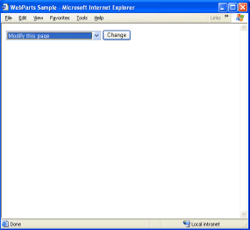
Browse to the page:Browse to the Sample Page The first time you run the page you will get a not very interesting empty page, just with the WebPartPage menu in Browse mode like the following image shows:
Set the page in CatalogDisplayMode:
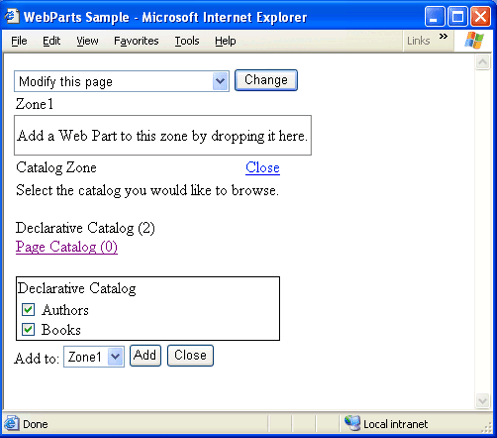
Now, in the drop down menu select the option "Add WebParts to this Page" and click Change
The page will show in Catalog DisplayMode so you can add new webparts to this page. In this case the only webparts that will be shown are the ones listed in the DeclarativeCatalogPart.
Add the WebParts
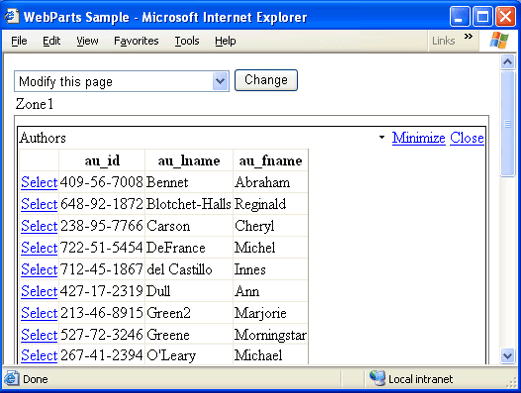
Now, Mark both Check Boxes and Click Add. You can see that you can add as many WebParts as you want.
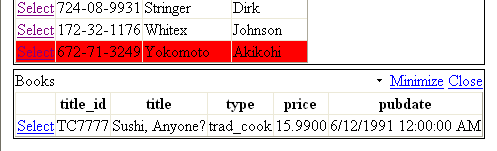
Now you get a much more interesting page that allows you to minimize/restore/close parts of your page. It displays a list of all authors and a list of all books.
Now, lets link them together so you don't get all books but only the books for the selected author.
For this, select the option "Connect Web Parts on this Page" and press Change
This will set the page in Connect Mode where you can establish connections between webparts. When you are on this mode you will get a small "black arrow" just at the left of the "Minimize" verb that you can click to see the "Connect Verb"
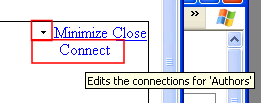
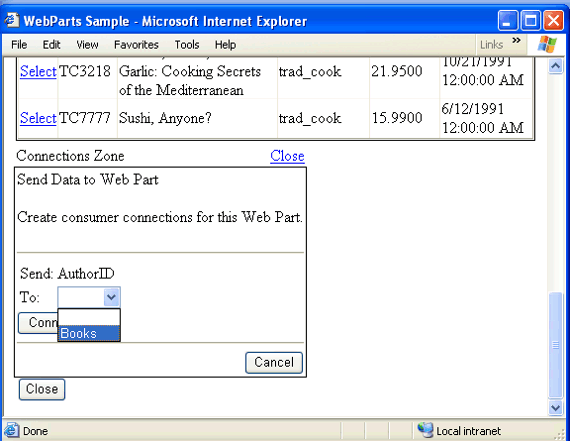
Select the Connect verb in the Authors WebPart and scroll to the bottom of the page where the ConnectionZone will be visible.
Click the link "Create a connection to a Consumer" and set the Books option in the drop down so both webparts get connected. Click Connect. And then Close the Connections Zone
Finally it works!!!
Now every time you select an Author in the Authors WebPart it will display only the books for the selected author instead of the whole list.
Summary
This sample, shows how you can use several features in WebParts to create very dynamic applications.
Carlos Aguilar Mares © 2017