
MruModule: IIS Manager 7 Extensibility Module for most recently used tasks
IIS Manager MRU Module: Most Recently Used module for IIS 7
IIS 7 UI Extensibility Sample
|
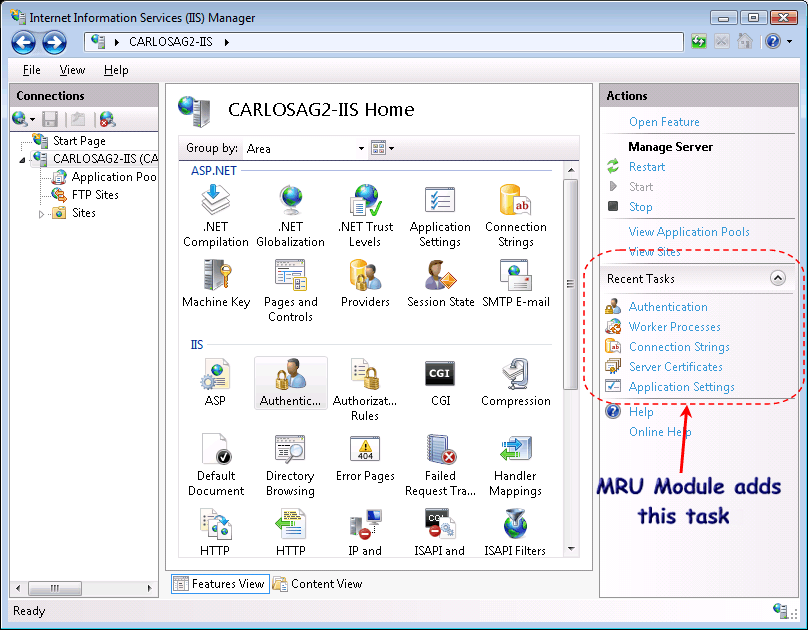
This module provides IIS Manager 7 a "Recent Tasks" at the bottom of the Actions Panel where it keeps track of all the features you have used sorted by most recently used. It includes MSI to install and source code is also available so you can see how this can be done. This has been tested using Windows Vista and the Windows Longhorn Server. This is a sample I decided to create and share it for the IIS community including the MSI for end-users, source code and setup project for developers. Download
To install the MRU IIS Manager
Module click here. Number of Downloads:
<%= string.Format("{0}", Globals.Downloads["MRUModuleSetup.zip"]) %>
To download source code click here Number of Downloads: <%= string.Format("{0}", Globals.Downloads["MRUModule.zip"])%>. After installing the MRUModule.msi whenever you use a feature inside IIS Manager it will keep track of the Most-Recently-Used tasks you navigate to, keeping a history per-object type (Server, Site, Application, Virtual Directory, Folder and File).
To use it just open InetMgr and navigate to any feature. Click Back in the navigation bar and you will see that the feature has been added to the list of recently used tasks in the Actions Panel. Note: If you don't see the tasks, see the Event Viewer application log to see what could have gone wrong. Drilling into the source codeThe source code includes a Visual Studio Solution that includes three Projects:
The way this module is implemented is very simple; IIS Manager exposes several services that give you access to the internal stuff happening inside. One of those services is the INavigationService. This service gives you all the information you need to interact with navigation, including the current item, the history and most importantly an event that notifies you whenever navigation occurs passing you the connection information as well as the page information we are navigating to. With this event now is just as simple as keeping a simple Dictionary where we index the pages that have been visited by the ConfigurationPathType. Finally the module also implements the IHomepageTaskListProvider interface. This interface allows developers to inject their own tasks to any home page shown inside IIS Manager. In my case I just return a set of Tasks that give a link to each of the pages. I hope this gives you an idea on how much infrastructure and work we have invested in the new IIS Manager to make sure it offers not only a nice UI but an entire platform that gives developers the power to bake in their features and offer their users an integrated solution, including remote management over SSL and many more cool features. |
Carlos Aguilar Mares © 2017