
CodeColorizer: Free Tool to Colorize Code in Html for Windows Live Writer
Windows Live Writer Plugin to Insert Colorized Code
 This Plugin allows you to add colorized code to your blogs using Windows Live Writer.
It includes support for:
- C#, VB.NET, J#, Javascript, Cobol, Algol
- HTML, XML, XSLT, .Config, Windows PowerShell
- T-SQL
- CSS, and many more...
Free Download:
To Install, just Download the .Zip file below and save the file CarlosAg.WindowsLive.Writer.Plugins.DLL into the Windows Live Writer plugins folder:C:\Program Files\Windows Live\Writer\Plugins
Click Here to Start Download (38KB)
Number of Downloads: <%= string.Format("{0}", Globals.Downloads["CarlosAg.WindowsLive.Writer.Plugins.zip"])%>
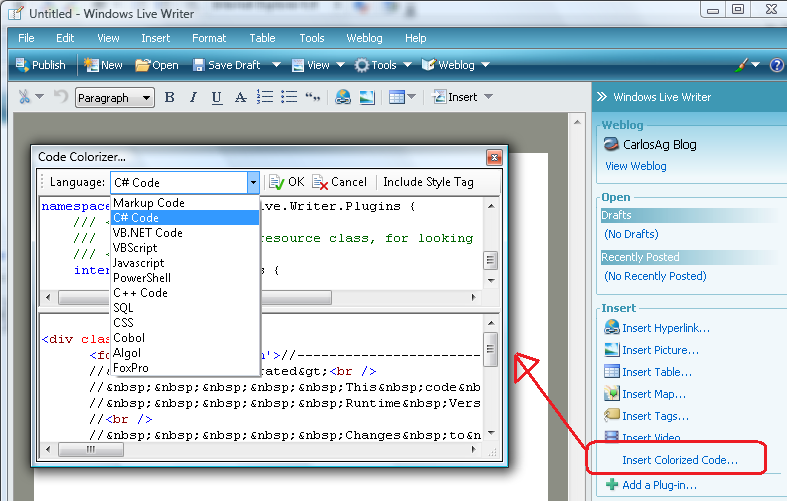
Figure: CarlosAg.CodeColorizer window. Here is a small preview of how it looks like.
History:
v1.0.0.0 Released: 03/03/2008
How to Use
- Just copy the file in the zip file to the Windows Live Plugin folder, typically C:\Program Files\Windows Live\Writer\Plugins
- Open Windows Live Writer
- You can launch the plugin by using the Menu Insert->Colorized Code, or use the Insert Colorized Code... in the Insert list in the right hand side panel
- Select the right language, and now you can write the code, paste it into the window.
- When you are done just click OK. and the right HTML will be inserted in your blog
    <style>
        .code {
            word-wrap:break-word;
            margin:10px;
            padding:10px;
            border:2px ridge white;
            background-color:#F5F5F5;
            font-family:Courier New;
            font-size:10pt;
            }
    </style>
Carlos Aguilar Mares © 2017